I'm moving this blog over to github in an desperate attempt to finally keep all my web stuff in a single place (plus: keeping the blog in a version-controlled repo is so much nicer than Blogger, finally no more looking for the perfect blog editor, better control over the layout etc etc etc...).
The new URL is: http://floooh.github.io/
See you on the other side :)
-Floh.
9 Jan 2016
10 Nov 2014
New Adventures in 8-Bit Land
Alan Cox’ recent announcement of his Unix-like operating system for old home computers got me thinking: wouldn’t it be cool write programs for the KC85/3 in C, a language it never officially supported?
For youngsters and Westerners: the KC85 home computer line was built in the 80’s in Eastern Germany, the most popular version, the KC85/3 had a 1.75MHz Z80-compatible CPU, and 16kByte each of general RAM, video RAM and ROM (so 32kByte RAM and 16kByte ROM). The ROM was split in half, 8kByte BASIC, 8kByte OS. Display was 320x256 pixels, a block of 8x4 pixels could have 1-out-of-16 foreground and 1-out-of-8 background colors. No sprite support, no dedicated sound chip, and the video RAM layout was extra-funky and had very slow CPU access.
MAME/MESS has rudimentary support for the KC85 line (and many other computers built behind the Iron Curtain) and I dabbled with the KC85 emulation in JSMESS a while ago, as can be seen here: http://www.flohofwoe.net/history.html. So far this dabbling was all about running old games on old (emulated) machines.
New Code on Old Machines
But what about running new code on old machines? And not just Z80 assembler code, but ‘modern’ C99 code?
Good 8-bit C compilers are surprisingly easy to find, since the Z80 lived on well into the 2000s for embedded systems. I first started looking for a Z80 LLVM backend, but after some more googling I decided to go for SDCC, which looks like the ‘industry standard’ for 8-bit CPUs and is still actively developed.
On OSX, a recent SDCC can be installed with brew:
> brew install sdccAfter I played a few minutes with the compiler I decided that starting right with C is a few steps too far.
MESS
First I had to get MESS running again. MESS is the son of MAME, focusing on vintage computer emulation instead of arcade machines. Since I last used it, MESS had been merged back into MAME, and development has been moved onto github: https://github.com/mamedev/mame
So first, git-clone and compile mess:
> git clone git@github.com:mamedev/mame.git mame
> cd mame
> make TARGET=mess
This produces a ‘mess64’ executable on OSX. Next KC85/3 and /4 system ROMs are needed, these can be found by googling for ‘kc85_3.zip MESS’ (for what it’s worth, I consider these ROMs abandonware). With the compiled mess and the ROMs, a KC85/3 session can now be started in MESS:
>./mess64 kc85_3 -rompath . -window -resolution 640x512And here we go:

Getting stuff into MESS
Next we need to figure out how to get code onto the emulator. The KC85 operating system ‘CAOS’ (for **C**assete **A**ided **O**perating **S**ystem - yes even East-German engineers had a sense for humor) didn’t have an ‘executable format’ like ELF, instead raw chunks of code and data were loaded from cassette tapes into memory. There was however a standardised format of how the data was stored on tape. Divided into chunks of 128 bytes, with the first chunk being the header with information at which address to load the following data. This tape format has survived as the ‘KCC file format’, where the first 128-byte chunk looks like this (taken from the kc85.c MESS driver source code):
struct kcc_header
{
    UINT8   name[10];
    UINT8   reserved[6];
    UINT8   number_addresses;
    UINT8   load_address_l;
    UINT8   load_address_h;
    UINT8   end_address_l;
    UINT8   end_address_h;
    UINT8   execution_address_l;
    UINT8   execution_address_h;
    UINT8   pad[128-2-2-2-1-16];
};
A .KCC file can be loaded into MESS using the -quik command line arg, e.g.:
>./mess64 kc85_3 -quik test.kcc -rompath . -window -resolution 640x512So if we had a piece of KC85/3 compatible machine code, and put it into a file with a 128-byte KCC header in front, we should be able to load this into the emulator.
The canonical ‘Hello World’ program for the KC85/3 looks like this in Z80 machine code:
0x7F 0x7F 'HELLO' 0x01
0xCD 0x03 0xF0
0x23
'Hello World\n\r' 0x00
0xC9
That’s a complete ‘Hello World’ in 27 bytes! Put these bytes somewhere in the KC85’s RAM, and after executing the command ‘MENU’ a new menu entry will show up named ‘HELLO’. To execute the program, type ‘HELLO’ and hit Enter:

How does this magic work? At the start is a special ‘7F 7F’ header which identifies these 27 bytes as a command line program called ‘HELLO’:
0x7F 0x7F 'HELLO' 0x01Execution starts right after the 0x01 byte:
0xCD 0x03 0xF0
0x23
The CD is the machine code of the Z80 subroutine-call instruction, followed by the call-target address 0xF003 (the Z80 is little-endian, like the x86), this is a call to a central operating system ‘jump vector’, the 0x23 identifies the operating system function, in this case the function is OSTR for ‘Output STRing’ (see page 43 of the system manual). This function outputs a string to the current cursor position. The string is not provided as a pointer, but directly embedded into the code after the call and terminated with a zero byte:
'Hello World\n\r' 0x00After the operating system function has executed, it will resume execution after the string’s 0-terminator byte.
The final C9 byte is the Z80 RETurn statement, which will give control back to the operating system.
This was the point where I started to write a bit of Python code which take a chunk of Z80 code, puts a KCC header in front and writes it to a .kcc file. And indeed the MESS loader accepted such a self-made ‘executable’ without problems.
Mnemonics
Before tackling the C programming challenge I decided to start smaller, with Z80 assembly code. The SDCC compiler comes (among others) with a Z80 assembler, but I found this hard to use (for instance, it generates intermediate ASCII Intel HEX files instead of raw binary files).
After some more googling I found z80asm which looked solid and easy to use. Again this can be installed via brew:
> brew install z80asmThe simple Hello World machine code blob from above looks like this in Z80 assembly mnemonics:
    org 0x200 ; start at address 0x200
    db 0x7F,0x7F,"HELLO",1
    call 0xF003
    db 0x23
    db "Hello World\r\n\0"
    ret
Much easier to read right? And even with comments! Running this file through z80asm yields a binary files with the exact same 27 bytes as the hand-crafted machine code version:
> z80asm hello.s -o hello.bin
> hexdump hello.bin
0000000 7f 7f 48 45 4c 4c 4f 01 cd 03 f0 23 48 65 6c 6c
0000010 6f 20 57 6f 72 6c 64 0d 0a 00 c9
000001b
With some more Python plumbing I was then able to ‘cross-assemble’ new programs for the KC85 in a modern development environment. Very cool!
C99
But the real challenge remains: compiling and running C code! Compiling a C source through SDCC generates a lot of output files, but none of them is the expected binary blob of executable code:
> sdcc hello.c
> ls
hello.asm   hello.ihx   hello.lst   hello.mem   hello.rst
hello.c     hello.lk    hello.map   hello.rel   hello.sym
There’s 2 interesting files: hello.asm is a human-readable assembler source file, and hello.ihx is the final executable, but in Intel HEX format. The .ihx file can be converted into a raw binary blob using the makebin program also coming with SDCC.
But even with a very simple C program there’s already a few things off:
- global variables are placed at address 0x8000 (32kBytes into the address space), on the KC85/3 this is video memory so the default address for data wouldn’t work
- if any global variables are initialized, then the resulting binary file is also at least 32 kBytes big, and has a lot of empty space inside
- there’s a few dozen bytes of runtime initialization code which isn’t needed in the KC85 environment (at least as long as we don’t want to use the C runtime)
Thankfully SDCC allows to tweak all this and allows to compile (and link) pieces of C code into raw blobs of machine code without any ‘runtime overhead’, it doesn’t even need a main function to produce a valid executable.
Currently I’m placing global data at address 0x200, and code at address 0x300 (so there’s 256 bytes for global data), and I’m disabling anything C-runtime related. And of course we need to tell the compiler to generate Z80 code, these are the important command line options for sdcc:
-mz80
--no-std-crt0 --nostdinc --nostdlib
--code-loc 0x300
--data-loc 0x200
With these compiler settings I’m getting the bare-bones Z80 code I want on the KC85. All that’s left now is some macros and system call wrapper functions to provide a KC-style runtime enviornment, and TADAA:
C99 programming on a 30 year old 8-bit home computer :D
Here’s the github link to the ‘kc85sdk’ (work in progress):
https://github.com/floooh/kc85sdk
Written with StackEdit.


8 Oct 2014
Cross-Platform Multitouch Input
TL;DR: A look at the low-level touch-input APIs on iOS, Android NDK and emscripten, and how to unify them for cross-platform engines with links to source code.
Why
Compared to mouse, keyboard and gamepad, handling multi-touch input is a complex topic because it usually involves gesture recognition, at least for simple gestures like tapping, panning and pinching. When I worked on mobile platforms in the past, I usually tried to avoid processing low-level touch input events directly, and instead used gesture recognizers provided by the platform SDKs:
On iOS gesture recognizers are provided by the UIKit, they are attached to an UIView object, and when the gesture recognizer detects a gesture it will invoke a callback method. The details are here: GestureRecognizer_basics.html
The Android NDK itself has no built-in gesture recognizers, but comes with source code for a few simple gesture detectors in the ndk_helpers source code directory
There’s 2 problem with using SDK-provided gesture detectors. First, iOS and Android detectors behave differently. A pinch in the Android NDK is something slightly different then a pinch in the iOS SDK, and second, the emscripten SDK only provides the low-level touch events as provided by HTML5 Touch Event API, no high-level gesture recognizers.
So, to handle all 3 platforms in a common way, there doesn’t seem to be a way around writing your own gesture recognizers and trying to reduce the platform-specific touch event information into a platform-agnostic common subset.
Platform-specific touch events
Let’s first look at the low-level touch events provided by each platform in order to merge their common attributes into a generic touch event:
iOS touch events
On iOS, touch events are forwarded to UIView callback methods (more specifically, UIResponder, which is a parent class of UIView). Multi-touch is disabled by default and must be enabled first by setting the property multipleTouchEnabled to YES.
The callback methods are:
- touchesBegan:withEvent:
- touchesMoved:withEvent:
- touchesEnded:withEvent:
- touchesCancelled:withEvent:
All methods get an NSSet of UITouch object as first argument and an UIEvent as second argument.
The arguments are a bit non-obvious: the set of UITouches in the first argument is not the overall number of current touches, but only the touches that have changed their state. So if there’s already 2 fingers down, and a 3rd finger touches the display, a touchesBegan will be received with a single UITouch object in the NSSet argument, which describes the touch of the 3rd finger that just came down. Same with touchEnded and touchMoved, if one of 3 fingers goes up (or moves), the NSSet will only contain a single UITouch object for the finger that has changed its state.
The overall number of current touches is contained in the UIEvent object, so if 3 fingers are down, the UIEvent object contains 3 UITouch objects. The 4 callback methods and the NSSet argument are actually redundant, since all that information is also contained in the UIEvent object. A single touchesChanged callback method with a single UIEvent argument would have been enough to communicate the same information.
Let’s have a look at the information provided by UIEvent, first there’s the method allTouches which returns an NSSet of all UITouch objects in the event and there’s a timestamp when the event occurred. The rest is contained in the returned UITouch objects:
The UITouch method locationInView provides the position of the touch, the phase value gives the current state of the touch (began, moved, stationary, ended, cancelled). The rest is not really needed or specific to the iOS platform.
Android NDK touch events
On Android, I assume that the Native Activity is used, with the android_native_app_glue.h helper classes. The application wrapper class android_app allows to set a single input event callback function which is called whenever an input event occurs. Android NDK input events and access functions are defined in the “android/input.h” header. The input event struct AInputEvent itself is isn’t public, and can only be accessed through accessor functions defined in the same header.
When an input event arrives at the user-defined callback function, first check whether it is actually a touch event:
int32_t type = AInputEvent_getType(aEvent);
if (AINPUT_EVENT_TYPE_MOTION == type) {
  // yep, a touch event
}
Once it’s sure that the event is a touch event, the AMotionEvent_ set of accessor functions must be used to extract the rest of the information. There’s a whole lot of them, but we’re only interested in the attributes that are also provided by other platforms:
AMotionEvent_getAction();
AMotionEvent_getEventTime();
AMotionEvent_getPointerCount();
AMotionEvent_getPointerId();
AMotionEvent_getX();
AMotionEvent_getY();
Together, these functions provide the same information as the iOS UIEvent object, but the information is harder to extract.
Let’s start with the simple stuff: A motion event contains an array of touch points, called ‘pointers’, one for each finger touching the display. The number of touch points is returned by the AMotionEvent_getPointerCount() function, which takes an AInputEvent* as argument. The accessor functions AMotionEvent_getPointerId(), AMotionEvent_getX() and AMotionEvent_getY() take an AInputEvent* and an index to acquire an attribute of the touch point at the specified index. AMotionEvent_getX()/getY() extract the X/Y position of the touch point, and the AMotionEvent_getPointerId() function returns a unique id which is required to track the same touch point across several input events.
AMotionEvent_getAction() provides 2 pieces of information in a single return value: the actual ‘action’, and the index of the touch point this action applies to:
The lower 8 bits of the return value contain the action code for a touch point that has changed state (whether a touch has started, moved, ended or was cancelled):
AMOTION_EVENT_ACTION_DOWN
AMOTION_EVENT_ACTION_UP
AMOTION_EVENT_ACTION_MOVE
AMOTION_EVENT_ACTION_CANCEL
AMOTION_EVENT_ACTION_POINTER_DOWN
AMOTION_EVENT_ACTION_POINTER_UP
Note that there are 2 down events, DOWN and POINTER_DOWN. The NDK differentiates between ‘primary’ and ‘non-primary pointers’. The first finger down generates a DOWN event, the following fingers POINTER_DOWN events. I haven’t found a reason why these should be handled differently, so both DOWN and POINTER_DOWN events are handled the same in my code.
The upper 24 bits contain the index (not the identifier!) of the touch point that has changed its state.
emscripten SDK touch events
Touch input in emscripten is provided by the new HTML5 wrapper API in the ‘emscripten/html5.h’ header which allows to set callback functions for nearly all types of HTML5 events (the complete API documentation can be found here.
To receive touch-events, the following 4 functions are relevant:
emscripten_set_touchstart_callback()
emscripten_set_touchend_callback()
emscripten_set_touchmove_callback()
emscripten_set_touchcancel_callback()
These set the application-provided callback functions that are called when a touch event occurs.
There’s a caveat when handling touch input in the browser: usually a browser application doesn’t start in fullscreen mode, and the browser itself uses gestures for navigation (like scrolling, page-back and page-forward). The emscripten API allows to refine the events to specific DOM elements (for instance the WebGL canvas of the application instead of the whole HTML document), and the callback can decide to ‘swallow’ the event so that standard handling by the browser will be supressed.
The first argument to the callback setter functions above is a C-string pointer identifying the DOM element. If this is a null pointer, events from the whole webpage will be received. The most useful value is “#canvas”, which limits the events to the (WebGL) canvas managed by the emscripten app.
In order to suppress default handling of an event, the event callback function should return ‘true’ (false if default handling should happen, but this is usually not desired, at least for games).
The touch event callback function is called with the following arguments:
int eventType,
const EmscriptenTouchEvent* event
void* userData
eventType will be one of:
EMSCRIPTEN_EVENT_TOUCHSTART
EMSCRIPTEN_EVENT_TOUCHEND
EMSCRIPTEN_EVENT_TOUCHMOVE
EMSCRIPTEN_EVENT_TOUCHCANCEL
The 4 different callbacks are again kind of redundant (like in iOS), it often makes sense to route all 4 callbacks to the same handler function and differentiate there through the eventType argument.
The actual touch event data is contained the EmscriptenTouchEvent structure, interesting for us is the member int numTouches and an array of EmscriptenTouchPoint structs. A single EmscriptenTouchPoint has the fields identifier, isChanged and the position of the touch in canvasX, canvasY (other member omitted for clarity).
Except for the timestamp of the event, this is the same information provided by the iOS and Android NDK touch APIs.
Bringing it all together
The cross-section of all 3 touch APIs provides the following information:
- a notification when the touch state changes:
- a touch-down was detected (a new finger touches the display)
- a touch-up was detected (a finger was lifted off the display)
- a movement was detected
- a cancellation was detection
- information about all current touch points, and which of them has changed state
- the x,y position of the touch
- a unique identifier in order to track the same touch point over several input events
The touch point identifier is a bit non-obvious in the iOS API since the UITouch class doesn’t have an identifier member. On iOS, the pointer to an UITouch object serves as the identifier, the same UITouch object is guaranteed to exist as long as the touch is active.
Also, another crucial piece of information is the timestamp when the event occurred. iOS and Android NDK provide this with their touch events, but not the emscripten SDK. Since the timestamps on Android and iOS have different meaning anyway, I’m simply tracking my own time when the events are received.
My unified, platform-agnostic touchEvent now basically looks like this:
struct touchEvent {
    enum touchType {
        began,
        moved,
        ended,
        cancelled,
        invalid,
    } type = invalid;
    TimePoint time;
    int32 numTouches = 0;
    static const int32 MaxNumPoints = 8;
    struct point {
        uintptr identifier = 0;
        glm::vec2 pos;
        bool isChanged = false;
    } points[MaxNumPoints];
}
TimePoint is an Oryol-style timestamp object. The uintptr datatype for the identifier is an unsigned integer with the size of a pointer (32- or 64-bit depending on platform).
Platform-specific touch events are received, converted to generic touch events, and then fed into custom gesture recognizers:
- iOS touch event source code
- Android touch event source code
- emscripten touch event source code (plus mouse and keyboard input handling)
Simple gesture detector source code:
- tap detector
- panning detector
- pinch detector
And a simple demo (the WebGL version has only been tested on iOS8, mobile Safari’s WebGL implementation still has bugs):
- WebGL demo
- Android self-signed APK
And that’s all for today :)
Written with StackEdit.
24 May 2014
Shader Compilation and IDEs
I recently played around with shader code generation and the GLSL reference compiler in Oryol.
The result is IMHO pretty neat:
Shader source files (*.shd) live in the IDE next to C++ files:
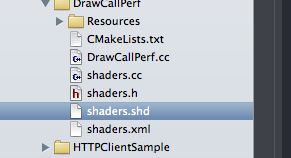
Shader files are written in normal GLSL syntax with custom annotations (those @ and $ tags):

When compiling the project, a custom build step will generate vertex- and fragment shaders for different GLSL versions and run them through the GLSL reference compiler. Any errors from the reference compiler are converted to a format which can be parsed by the IDE:

Error parsing also works in Visual Studio:

Unfortunately I couldn’t get error parsing to work in QtCreator on Linux. The error messages are recognised, but double-clicking them doesn’t work.
After the GLSL compiler pass, a C++ header/source file pair will be created which contains the GLSL shader code and some C++ glue to make the shader accessible from the engine side.
The edit-compile-test cycle is only one or two seconds, depending on the link time of the demo code. Also, since the shader generation runs as a normal build step, shader code will also be generated and validated in command line builds.
Here’s how it works:
When cmake runs to create the build files it will look for XML files in the source code directories. For each XML file, a custom build target will be created which invokes a python script. This ‘generator script’ will generate a C++ header/source pair during compilation.
This generic code generation has only been used so far for the Oryol Messaging system, but it is flexible enough to cover other code generation scenarios (like generating shader code).
Setting up the custom build target involves 3 steps:
The actual build target must be created, cmake has the add_custom_target macro for this:
add_custom_target(${target}_gen
  COMMAND ${PYTHON}
  ${ORYOL_ROOT_DIR}/generators/generator.py
  ${xmlFiles}
  COMMENT "Generating sources...")
This statement takes a variable target with the name of the build target which will compile the generated C++ sources plus a xmlFiles list variable and it will generate a new build target called [target]_gen The variables PYTHON and ORYOL_ROOT_DIR are config variables pointing to the python executable and the Oryol root directory.
To get the right build order, a target dependency must be defined so that the generated target is always run before the build target which needs the generated C++ source code:
add_dependencies(${target} ${target}_gen)Finally we need to resolve a chicken-egg situation. All C++ files must exist when cmake assembles the build files, but the generated C++ files will only be created during the first build. To fix this situation, empty placeholder files are created if the generated sources don’t exist yet:
foreach(xmlFile ${xmlFiles})
    string(REPLACE .xml .cc src ${xmlFile})
    string(REPLACE .xml .h hdr ${xmlFile})
    if (NOT EXISTS ${src})
        file(WRITE ${src} " ")
    endif()
    if (NOT EXISTS ${hdr})
        file(WRITE ${hdr} " ")
    endif()
endforeach()
These 3 steps take care of the build configuration via cmake.
On to the python generator script:
First, the generator script parses the XML ‘source file’ which caused its invokation. For the shader generator, the XML file is very simple:
<Generator type="ShaderLibrary" name="Shaders" >
    <AddDir path="shd"/>
</Generator>
The most important piece is the AddDir tag which tells the generator script where it finds the actual shader source files. More then one AddDir can be added if the shader sources are spread over different directories.
Generator scripts must also include a dirty-check and only actually overwrite the target C++ files when the source files (in this case: the XML file and all shader sources) are newer then the target sources to prevent unneeded compilation of dependent files.
Shader File Parsing
Shader files will be processed by a simple line-parser:
- comments and white-space will be removed
- find and process ‘@’ and ‘$’ keywords
- gather GLSL code lines and keep track of their source file and line numbers (this is important for mapping error messages back later)
A very minimal shader file looks like this:
@vs MyVertexShader
@uniform mat4 mvp ModelViewProj
@in vec4 position
@in vec2 texcoord0
@out vec2 uv
void main() {
  $position = mvp * position;
  uv = texcoord0;
@end

@fs MyFragmentShader
@uniform sampler2D tex Texture
@in vec2 uv
void main() {
  $color = $texture2D(tex, uv);
}
@end

@bundle Main
@program MyVertexShader MyFragmentShader
@end
This defines one vertex shader (between the @vs and @end tags) and a matching fragment shader (between @fs and @end). The vertex shader defines a 4x4 matrix uniform with the GLSL variable name mvp and the ‘bind name’ ModelViewProj, and it expects position and texture coordinates from the vertex. The vertex shader transforms the vertex-position into the special variable $position and forwards the texture coordinate to the fragment shader.
The fragment shader defines a texture sampler uniform with the GLSL variable name tex and the bind name Texture. It takes the texture coordinates emitted by the vertex shader, samples the texture and writes the color into the special variable $color.
Finally a shader @bundle with the name ‘Main’ is defined, and one shader program created from the previously defined vertex- and fragment-shader is attached to the bundle. A shader bundle is an Oryol-specific concept and is simply a collection of one or more shader programs that are related to each other.
Another useful tag which isn’t used in this simple example are the @block and @use tag. A @block encapsulates a piece of code which can then later be included with a @use tag in other blocks or vertex-/fragment-shaders. This is basically the missing #include mechanism for GLSL files.
Here’s some @block sample code, first a Util block is defined with general utility functions, then a block VSLighting which would contain lighting functions for vertex shaders, and FSLighting with lighting functions for fragment shaders. Both VSLighting and FSLighting want to use functions from the Util block (via @use Util). Finally the vertex- and fragment-shaders would contain a @use VSLighting and @use FSLighting (not shown). The shader code generator would then resolve all block dependencies and include the required the code blocks in the generated shader source in the right order:
@block Util
// general utility functions
vec4 bla() {
  vec4 result;
  ...
  return result;
}
@end

@block VSLighting
// lighting functions for the vertex shader
@use Util
vec4 vsBlub() {
  return bla();
}
@end

@block FSLighting
// lighting functions for the fragment shader
@use Util
vec4 fsBlub() {
  return bla();
}
@end
GLSL Code Generation and Validation
From the ‘tagged shader source’, the shader generator script will create actual vertex- and fragment-shader code for different GLSL versions and feed it to the reference compiler for validation.
For instance, the above simple vertex/fragment-shader source would produce the following GLSL 1.00 source code (for OpenGLES2 and WebGL):
uniform mat4 mvp;
attribute vec4 position;
attribute vec2 texcoord0;
varying vec2 uv;
void main() {
  gl_Position = mvp * position;
  uv = texcoord0;
}
The output for a more modern GLSL version would look slightly different:
#version 150
uniform mat4 mvp;
in vec4 position;
in vec2 texcoord0;
out vec2 uv;
void main() {
  gl_Position = mvp * position;
  uv = texcoord0;
}
The GLSL reference compiler is called once per GLSL version and vertex-/fragment-shader and the resulting output is captured into a string variable. The python code to start an exe and capture its output looks like this:
child = subprocess.Popen([exePath, glslPath], stdout=subprocess.PIPE)
out = ''
while True :
    out += child.stdout.read()
    if child.poll() != None :
        break
return out
The output will then be parsed for error messages and error line numbers. Since these line-numbers are pointing into the generated source code they are not useful themselves but must be mapped back to the original source-file-path and line-numbers. This is why the line-parser had to store this information with each extracted source code line.
The mapped source-file-path, line-number and error message must then be formatted into the gcc/clang- or VStudio-error-message format, and if an error occurs, the python script will terminate with an error code so that the build is stopped:
if platform.system() == 'Windows' :
    print '{}({}): error: {}'.format(FilePath, LineNumber + 1, msg)
else :
    print '{}:{}: error: {}\n'.format(FilePath, LineNumber + 1, msg)
if terminate:
    sys.exit(10)
This formatting works for Xcode and VisualStudio. The error is displayed by the IDE and can be double-clicked to position the text cursor over the right source code location. It doesn’t work in Qt Creator yet unfortunately, and I haven’t tested Eclipse yet.
Another thing to keep in mind is that build jobs can run in parallel. At first I was writing the intermediate GLSL files for the reference compiler into files with simple filenames (like ‘vs.vert’ and ‘fs.frag’). This didn’t cause any problems when doing trivial tests, but once I had converted all Oryol samples to use the shader generator I was sometimes getting weird errors from the reference compiler which didn’t make any sense at first.
The problem was that build jobs were running at the same time and overwrote each others intermediate files. The solution was to use randomized filenames which cannot collide. As always, python has a module just for this case called ‘tempfiles’:
# this writes to a new temp vertex shader file
f = tempfile.NamedTemporaryFile(suffix='.vert', delete=False)
writeFile(f, lines)
f.close()

# call the validator
...

# delete the temp file when done
os.unlink(f.name)
The C++ Side
Last but not least a quick look at the generated C++ source code. The C++ header defines a namespace with the name of the shader-library, and one class per shader-bundle. The very simple vertex/fragment-shader sample from above would generate a header like this:
#pragma once
/*  #version:1#
    machine generated, do not edit!
*/
#include "Render/Setup/ProgramBundleSetup.h"
namespace Oryol {
namespace Shaders {
class Main {
public:
  static const int32 ModelViewProj = 0;
  static const int32 Texture = 1;
  static Render::ProgramBundleSetup CreateSetup();
};
}
}
Note the ModelViewProj and Texture constant definitions. These are used to set the uniform values in the C++ render loop.
How this code is actually used for rendering is a topic of its own. For now let me just point to the Oryol sample source code:
https://github.com/floooh/oryol/tree/master/code/Samples/Render
What’s next
The existing shader tags are already quite useful but only the beginning. The real problem I want to solve is to manage slightly differing variations of the same shader. For instance there might exist a specific high-level material, which must be applied to static and skinned geometry (2 variations), can cast shadows (4 variations: static shadow caster, skinned shadow caster), should be available in a forward-renderer and deferred-renderer (== many more slightly different shader variations). Sometimes an ueber-shader approach is better, and sometimes actually separate shaders for each variation are better.
The guts of those material shaders are always built from the same small code fragments, just arranged and combined differently.
Hopefully a couple of new ‘@’ and ‘$’ tags will be enough, but how this will look like in detail I don’t know yet. One inspiration are web-template engines which build web pages from a set of templates and rules. Another inspiration are the existing connect-the-dots shader editors (even though I want to keep the focus on ‘shaders-as-source-code’, not ‘shader-as-data’, but some limited runtime-code-generation would still make sense).
And of course the right middle-ground between ‘modern GLSL’ and ‘legacy GLSL’ must be found. Unfortunately OpenGL ES2 / WebGL1.0 will have to be the foundation for quite some time.
And that’s all for today :)
Written with StackEdit.
20 Apr 2014
cmake and the Android NDK
TL;DR: how to build Android NDK applications with cmake instead of the custom NDK build system, this is useful for projects which already use cmake to create multiplatform/cross-compiling build files.
Update: Thanks to thp for pointing out a rather serious bug: packaging the standard shared libraries into the APK should NOT be necessary since these are pre-installed on the device. I noticed that I didn’t set a library search path to the toolchain lib dir in the linker step (-L…) which might explain the crash I had earlier, but unfortunately I can’t reproduce this crash anymore with the old behaviour (no library search path and no shared system libraries in the APK). I’ll keep an eye on that and update the blog post with my findings.
I’ve spent the last 2.5 days adding Android support to Oryol’s build system. This wasn’t exactly on my to-do list until I sorta “impulse-bought” a Nexus7 tablet last Thursday. It basically went like this “hey that looks quite neat for a non-iPad tablet => wow, scrolling feels smooth, very non-Android-like => holy shit it runs my Oryol WebGL samples at 60fps => hmm 179 Euros seems quite reasonable…” - I must say I’m impressed how far the Android “user experience” has come since I last dabbled with it. The UI finally feels completely smooth, and I didn’t have any of those Windows8-Metro-style WTF-moments yet.
Ok, so the logical next step would be to add support for Android to the Oryol build system (if you don’t know what Oryol is: it’s a new experimental C++11 multi-plat engine I started a couple months ago: https://github.com/floooh/oryol).
The Oryol build system is cmake-based, with a python script on top which simplifies managing the dozens of possible build-configs. A build-config is one specific combination of target-platform (osx, ios, win32, win64, …), build-tools (make, ninja, Visual Studio, Xcode, …) and compile-mode (Release, Debug) stored under a descriptive name (e.g. osx-xcode-debug, win32-vstudio-release, emscripten-make-debug, …).
The front-end python script called ‘oryol’ is used to juggle all the build-configs, invoke cmake with the right options, and perform command line builds.
One can for instance simply call:
> ./oryol update osx-xcode-debug…to generate an Xcode project.
Or to perform a command line build with xcodebuild instead:
> ./oryol build osx-xcode-debugOr to build Oryol for emscripten with make in Release mode (provided the emscripten SDK has been installed):
> ./oryol build emscripten-make-releaseThis also works on Windows (32- or 64-bit):
> oryol build win64-vstudio-debug
> oryol build win32-vstudio-debug
…or on Linux:
> ./oryol build linux-make-debugNow, what I want to do with my shiny new Nexus7 is of course this:
> ./oryol build android-make-debugThis turned out to be harder then usual. But lets start at the beginning:
A cross-compiling scenario is normally well defined in the GCC/cmake world:
A toolchain wraps the target-platform’s compiler tools, system headers and libs under a standardized directory structure:
The compiler tools usually reside in a bin subdirectory, and are called gcc and g++, or in the LLVM world: clang and clang++, sometimes the tools also have a prefix: pnacl-clang and pnacl-clang++), or they have completely different names (like emcc in the emscripten SDK).
Headers and libs are often located in a usr directory (usr/include and usr/lib).
The toolchain headers contain at least the the C-Runtime headers, like stdlib.h, stdio.h and usually the C++ headers (vector, iostream, …) and often also the OpenGL headers and other platform-specific header files.
Finally the lib directory contains precompiled system libraries for the target platform (for instance libc.a, libc++.a, etc…).
With such a standard gcc-style toolchain, cross-compilation is very simple. Just make sure that the toolchain-compiler tools are called instead of the host platform’s tools, and that the toolchain headers and libs are used.
cmake standardizes this process with its so-called toolchain-files. A toolchain-file defines what compilers tools, headers and libraries should be used instead of the ‘default’ ones, and usually also overrides compile and linker flags.
The typical strategy when adding a new target platform to a cmake build system looks like this:
- setup the target platform’s SDK
- create a new toolchain file (obviously)
- tell cmake where to find the compiler tools, header and libs
- add the right compile and linker flags
Once the toolchain file has been created, call cmake with the toolchain file:
> cmake -G"Unix Makefiles" -DCMAKE_TOOLCHAIN_FILE=[path-to-toolchain-file] [path-to-project]Then run make in verbose mode to check whether the right compiler is called, and with the right options:
> make VERBOSE=1This approach works well for platforms like emscripten or Google Native Client. Some platforms require a bit of additional cmake-magic, a Portable Native Client executable for instance must be “finalized” after it has been linked. Additional build steps like these can be added easily in cmake with the add_custom_command macro.
Integrating Android as a new target platform isn’t so easy though:
- the Android SDK itself only allows to create pure Java applications, for C/C++ apps, the separate Android NDK (Native Development Kit) is required
- the NDK doesn’t produce complete Android applications, it needs the Android Java SDK for this
- native Android code isn’t a typical executable, but lives in a shared library which is called from Java through JNI
- the Android SDK and NDK both have their own build systems which hide a lot of complexity
- …this complexity comes from the combination of different host platforms (OSX, Linux, Windows), target API levels (android-3 to android-19, roughly corresponding to Android versions), compiler versions (gcc4.6, gcc4.9, clang3.3, clang3.4), and finally CPU architectures and instruction sets (ARM, MIPS, X86, with several variations for ARM (armv5, armv7, with or without NEON, etc…)
- C++ support is still bolted on, the C++ headers and libs are not in their standard locations
- the NDK doesn’t follow the standard GCC toolchain directory structure at all
The custom build system coming with the NDK does a good job to hide all this complexity, for instance it can automatically build for all CPU architectures, but it stops after the native shared library has been compiled: it cannot create a complete Android APK. For this, the Android Java SDK tools must be called from the command line.
So back to how to make this work in cmake:
The plan looks simple enough:
- compile our C/C++ code into a shared library instead of an executable
- somehow get this into a Java APK package file…
- …deploy APK to Android device and run it
Step 1 starts rather innocent, create a toolchain file, look up the paths to the compiler tools, headers and libs in the NDK, then lookup the compiler and linker command line args by watching a verbose build. Then put all this stuff into the right cmake variables. At least this is how it usually works. Of course for Android it’s all a bit more complicated:
- first we need to decide on a target CPU architecture and what compiler to use. I settled for ARM and gcc4.8, which leads us to […]/android-ndk-r9d/toolchains/arm-linux-androideabi-4.8/prebuilt
- in there is a directory darwin-x86_64 so we need separate paths by host platform here
- finally in there is a bin directory with the compiler tools, so GCC would be for instance at [..]/android-ndk-r9d/toolchains/arm-linux-androideabi-4.8/prebuilt/darwin-x86_64/bin/arm-linux-androideabi-gcc
- there’s also an include, lib and share directory but the stuff in there definitely doesn’t look like system headers and libs… bummer.
- the system headers and libs are under the platforms directory instead: [..]/android-ndk-r9d/platforms/android-19/arch-arm/usr/include, and [..]/android-ndk-r9d/platforms/android-19/arch-arm/usr/lib
- so far so good… put this stuff into the toolchain file and it seems to compile fine – until the first C++ header must be included - WTF?
- on closer inspection, the system include directory doesn’t contain any C++ headers, and there’s different C++ lib implementations to choose from under [..]/android-ndk-r9d/sources/cxx-stl
This was the point where was seriously thinking about calling it a day until I stumbled across the make-standalone-toolchain.sh in build/tools. This is a helper script which will build a standard GCC-style toolchain for one specific Android API-level and target CPU:
sh make-standalone-toolchain.sh –-platform=android-19
  –-ndk-dir=/Users/[user]/android-ndk-r9d
  –-install-dir=/Users/[user]/android-toolchain
  –-toolchain=arm-linux-androideabi-4.8
  --system=darwin-x86_64
This will extract the right tools, headers and libs, and also integrate C++ headers (by default gnustl, but can be selected with the –stl option). When the script is done, a new directory ‘android-toolchain’ has been created which follows the GCC toolchain standard, and is much easier to integrate with cmake:
The important directories are:
- [..]/android-toolchain/bin, this is where the compiler tools are located, these are still prefixed though (e.g. arm-linux-androideabi-gcc
- [..]/android-toolchain/sysroot/usr/include CRT headers, plus EGL, GLES2, etc…, but NOT the C++ headers
- [..]/android-toolchain/include the C++ headers are here, under ‘c++’
- [..]/android-toolchain/sysroot/usr/lib .a and .so system libs, libstc++.a/.so is also here, no idea why
After setting these paths in the toolchain file, and telling cmake to create shared-libs instead of exes when building for the Android platform I got the compiler and linker steps. Instead of a CoreHello executable, I got a libCoreHello.so. So far so good.
Next step was to figure out how to get this .so into a APK which can be uploaded to an Android device.
The NDK doesn’t help with this, so this is where we need the Java SDK tools, which uses yet another build system: ant. From looking at the SDK samples I figured out that it is usually enough to call ant debug or ant release within a sample directory to build an .apk file into a bin subdirectory. ant requires a build.xml file which defines the build tasks to perform. Furthermore, Android apps have an embedded AndroidManifest.xml file which describes how to run the application, and what privileges it requires. None of these exist in the NDK samples directories though…
After some more exploration it became clear: The SDK has a helper script called android which is used (among many other things) to setup a project directory structure with all required files for ant to create a working APK:
> android create project
    --path MyApp
    --target android-19
    --name MyApp
    --package com.oryol.MyApp
    --activity MyActivity
This will setup a directory ‘MyApp’ with a complete Android Java skeleton app. Run ‘ant debug’ in there and it will create a ‘MyApp-debug.apk’ in the ‘bin’ subdirectory which can be deployed to the Android device with ‘adb install MyApp-debug.apk’, which when executed displays a ‘Hello World, MyActivity’ string.
Easy enough, but there are 2 problems, first: how to get our native shared library packaged and called?, and second: the Java SDK project directory hierarchy doesn’t really fit well into the source tree of a C/C++ project. There should be a directory per sample app with a couple of C++ files and a CMakeLists.txt file and nothing more.
The first problem is simple to solve: the project directory hierarchy contains a libs directory, all .so files in there will be copied into the APK by ant (to verify this: a .apk is actually a zip file, simply changed the file extension to zip and peek into the file). One important point: the lib directory contains one sub-directory-level for the CPU architecture, so once we start to support multiple CPU instruction sets we need to put them into subdirectories like this:
FlohOfWoe:libs floh$ ls
armeabi     armeabi-v7a mips        x86
Since my cmake build-system currently only supports building for armeabi-v7a I’ve put my .so file in the armeabi-v7a subdirectory.
Now I thought that I had everything in place, I got an APK file with my native code .so lib in it, I used the NativeActivity and the android_native_app_glue.h approach, and logged out a “Hello World” to the system log (which can be inspected with adb logcat from the host system).
And still the App didn’t start, instead this showed up in the log:
D/AndroidRuntime(  482): Shutting down VM
W/dalvikvm(  482): threadid=1: thread exiting with uncaught exception (group=0x41597ba8)
E/AndroidRuntime(  482): FATAL EXCEPTION: main
E/AndroidRuntime(  482): Process: com.oryol.CoreHello, PID: 482
E/AndroidRuntime(  482): java.lang.RuntimeException: Unable to start activity ComponentInfo{com.oryol.CoreHello/android.app.NativeActivity}: java.lang.IllegalArgumentException: Unable to load native library: /data/app-lib/com.oryol.CoreHello-1/libCoreHello.so
E/AndroidRuntime(  482):    at android.app.ActivityThread.performLaunchActivity(ActivityThread.java:2195)
This was the second time where I banged my head against the wall for a while until I started to look into how linker dependencies are resolved for the shared library. I was pretty sure that I gave all the required libs on the linker command line (-lc -llog -landroid, etc), the error was that I assumed that these are linked statically. Instead default linking against system libraries is dynamic. The ndk-depends helps in finding the dependencies:
localhost:armeabi-v7a floh$ ~/android-ndk-r9d/ndk-depends libCoreHello.so
libCoreHello.so
libm.so
liblog.so
libdl.so
libc.so
libandroid.so
libGLESv2.so
libEGL.so
This is basically the list of .so files which must be contained in the APK. After I copied these to the SDK project's lib directory, together with my libCoreHello.so. Update: These shared libs are not supposed to be packaged into the APK! Instead the standard system shared libraries which already exist on the device should be linked at startup.
I finally saw the sweet, sweet ‘Hello World!’ showing up in the adb log!
But I skipped one important part: so far I fixed everything manually, but of course I want automated Android batch builds, and without having those ugly Android skeleton project files in the git repository.
To solve this I did a bit of cmake-fu:
Instead of having the Android SDK project files committed into version control, I’m treating these as temporary build files.
When cmake runs for an Android build target, it does the following additional steps:
For each application target, a temporary Android SDK project is created in the build directory (basically the ‘android create project’ call described above):
# call the android SDK tool to create a new project
execute_process(COMMAND ${ANDROID_SDK_TOOL} create project
                --path ${CMAKE_CURRENT_BINARY_DIR}/android
                --target ${ANDROID_PLATFORM}
                --name ${target}
                --package com.oryol.${target}
                --activity DummyActivity
                WORKING_DIRECTORY ${CMAKE_CURRENT_BINARY_DIR})
The output directory for the shared library linker step is redirected to the ‘libs’ subdirectory of this skeleton project:
# set the output directory for the .so files to point to the android project's 'lib/[cpuarch] directory
set(ANDROID_SO_OUTDIR ${CMAKE_CURRENT_BINARY_DIR}/android/libs/${ANDROID_NDK_CPU})
set_target_properties(${target} PROPERTIES LIBRARY_OUTPUT_DIRECTORY ${ANDROID_SO_OUTDIR})
set_target_properties(${target} PROPERTIES LIBRARY_OUTPUT_DIRECTORY_RELEASE ${ANDROID_SO_OUTDIR})
set_target_properties(${target} PROPERTIES LIBRARY_OUTPUT_DIRECTORY_DEBUG ${ANDROID_SO_OUTDIR})
The required system shared libraries are also copied there: (DON’T DO THIS, normally the system’s standard shared libraries should be used)
# copy shared libraries over from the Android toolchain directory
# FIXME: this should be automated as post-build-step by invoking the ndk-depends command
# to find out the .so's, and copy them over
file(COPY ${ANDROID_SYSROOT_LIB}/libm.so DESTINATION ${ANDROID_SO_OUTDIR})
file(COPY ${ANDROID_SYSROOT_LIB}/liblog.so DESTINATION ${ANDROID_SO_OUTDIR})
file(COPY ${ANDROID_SYSROOT_LIB}/libdl.so DESTINATION ${ANDROID_SO_OUTDIR})
file(COPY ${ANDROID_SYSROOT_LIB}/libc.so DESTINATION ${ANDROID_SO_OUTDIR})
file(COPY ${ANDROID_SYSROOT_LIB}/libandroid.so DESTINATION ${ANDROID_SO_OUTDIR})
file(COPY ${ANDROID_SYSROOT_LIB}/libGLESv2.so DESTINATION ${ANDROID_SO_OUTDIR})
file(COPY ${ANDROID_SYSROOT_LIB}/libEGL.so DESTINATION ${ANDROID_SO_OUTDIR})
The default AndroidManifest.xml file is overwritten with a customized one:
# override AndroidManifest.xml
file(WRITE ${CMAKE_CURRENT_BINARY_DIR}/android/AndroidManifest.xml
    "<manifest xmlns:android=\"http://schemas.android.com/apk/res/android\"\n"
    "  package=\"com.oryol.${target}\"\n"
    "  android:versionCode=\"1\"\n"
    "  android:versionName=\"1.0\">\n"
    "  <uses-sdk android:minSdkVersion=\"11\" android:targetSdkVersion=\"19\"/>\n"
    "  <uses-feature android:glEsVersion=\"0x00020000\"></uses-feature>"
    "  <application android:label=\"${target}\" android:hasCode=\"false\">\n"
    "    <activity android:name=\"android.app.NativeActivity\"\n"
    "      android:label=\"${target}\"\n"
    "      android:configChanges=\"orientation|keyboardHidden\">\n"
    "      <meta-data android:name=\"android.app.lib_name\" android:value=\"${target}\"/>\n"
    "      <intent-filter>\n"
    "        <action android:name=\"android.intent.action.MAIN\"/>\n"
    "        <category android:name=\"android.intent.category.LAUNCHER\"/>\n"
    "      </intent-filter>\n"
    "    </activity>\n"
    "  </application>\n"
    "</manifest>\n")
And finally, a custom build-step to invoke the ant-build tool on the temporary skeleton project to create the final APK:
if ("${CMAKE_BUILD_TYPE}" STREQUAL "Debug")
    set(ANT_BUILD_TYPE "debug")
else()
    set(ANT_BUILD_TYPE "release")
endif()
add_custom_command(TARGET ${target} POST_BUILD COMMAND ${ANDROID_ANT} ${ANT_BUILD_TYPE} WORKING_DIRECTORY ${CMAKE_CURRENT_BINARY_DIR}/android)
With all this in place, I can now do a:
> ./oryol make CoreHello android-make-debugTo compile and package a simple Hello World Android app!
What’s currently missing is a simple wrapper to deploy and run an app on the device:
> ./oryol deploy CoreHello
> ./oryol run CoreHello
These would be simple wrappers around the adb tool, later this should of course also work for iOS apps.
Right now the Android build system only works on OSX and only for the ARM V7A instruction set, and there’s no proper Android port of the actual code yet, just a single log message in the CoreHello sample.
Phew, that’s it! All this stuff is also available on github (https://github.com/floooh/oryol/tree/master/cmake).
Written with StackEdit.
2 Feb 2014
It's so quiet here...
…because I’m doing a lot of weekend coding at the moment. I basically caught the github bug over the holidays:
I’ve been playing around with C++11, python, Vagrant, puppet and chef recently:
C++11:
- I like: move semantics, for (:), variadic template arguments, std::atomic, std::thread, std::chrono, possibly std::function and std::bind (haven’t played around with these yet)
- (still) not a big fan of: auto, std containers, exceptions, rtti, shared_ptr, make_shared
- thread_local vs __thread vs __declspec(thread) is still a mess across Clang/OSX, GCC and VisualStudio
- the recent crazy-talk about integrating a 2D drawing API into the C++ standard gives me the shivers, what a terrible, terrible idea!
Python
- best choice/replacement for command-line scripts and asset tools (all major 3D modelling/animation tools are python-scriptable)
- performance of the standard python interpreter is disappointing, and making something complex like FBX SDK work in alternative Python compilers is difficult or impossible
Vagrant plus Puppet or Chef
- Vagrant is extremely cool for having an isolated cross-compilation Linux VM for emscripten and PNaCl, instead of writing a readme with all the steps required to get a working build machine, you can simply check-in a Vagrantfile into the versioning system repository, and other programmers simply do a ‘vagrant up’ and have a VM which ‘just works’
- the slow performance of shared directories on VirtualBox requires some silly workarounds, supposedly this is better with VMWare Fusion, but haven’t tried yet
- Puppet vs Chef are like Coke vs Pepsi for such simple “stand-alone” use-cases. Chef seems to be more difficult to get into, but I think in the end it is more rewarding when trying to “scale up”
Written with StackEdit.
Subscribe to:
Posts (Atom)