23 Oct 2009

Drakensang River Of Time Intro

Here’s the intro video of our new Drakensang game (River Of Time):

(Go here for the bigger version)

The cutscene has been created in-engine with our new cutscene editor tool described in one of my former blog posts, and then captured frame by frame and encoded with Bink at 1280x720 (the YouTube version unfortunately looks quite a bit darker then the original if I’m not mistaken). The characters have higher resolution meshes and textures created especially for the intro video, but the underlying joint skeleton and facial animation system is identical with the ingame-characters. The decision to encode the cutscene into a video stream instead of running it in real-time was done early in the project to remove a few risks. We couldn’t be sure what the performance would look like with the high-res assets and all the dynamic lighting, and whether or not a lot of post-processing would be necessary after capturing the raw frames. Turns out that the real-time cutscene looks so good that no “cheating” was necessary, so in future projects we will probably do everything in real-time from the beginning.

The advantage of building and tweaking the cutscene with an instant real-time preview can’t be stressed enough. The intro to the original Drakensang was done the traditional way, short scenes have been built in Maya, rendered over night, and then arranged and cut in some video editing tool. The massive turn-around time between tweaking something and seeing the result was a huge problem and in the end we ran out of time. Creating the new intro video was completely painless and straight-forward. The artists actually had fun creating it (at least that’s the impression I got watching them from time to time hehe), and I think that’s clearly visible in the result :)

10 Oct 2009

Ninja Gaiden Sigma 2

I’ve played halfway through the campaign of NGS2 yesterday evening, with mixed emotions. It’s very obvious that the director of this game has a very different vision of Ninja Gaiden then Itagaki. Sometimes for the better, but most of the times I would not call the changes actual improvements. It’s surprising how many gameplay elements which worked well have been removed. I hope that some of the shortcomings will be fixed in the higher difficulty levels (I’m currently playing on Warrior difficulty).

The Good:
  • Graphics have improved dramatically! The game generally looks a lot crisper (I guess that NG2 was upscaled, and NS2S is native 720p), textures seems to be higher resolution, normal mapping and specular highlight effects have been tuned, it’s really a difference like night and day (in some cases literally, when returning to the Ninja village in chapter 2 it is now broad daylight, not night time). This is what the original NG2 should have looked like.
  • New minions: There are a couple of new enemies in the game, some variations of NG2 minions, and some variations of original Ninja Gaiden monsters.
  • New and tweaked bosses: There are a couple of new boss fights in the game which are variations of the final boss in the original NG2. The Genshi fights are more interesting (you can now do an Izuna Drop on Genshi for instance).
  • Excessive rocket spam removed: that’s about the only good gameplay change, almost all of the “unfair” rocket spam has been removed.
  • Mission Mode now included in the game, plus Coop: Since the original NG2 wasn’t released in Germany, there’s also no downloadable content on the Xbox Live marketplace (damn you Microsoft). NG2S includes a mission mode, and adds 2-player-coop to those missions.

The Bad:

  • Much fewer enemies on screen: this is most painful change. The oh-shit-moments of NG2 when 15 blood-thirsty spider-clan-ninjas where rushing down a hallway, running into Ryu which is starting an Ultimate Technique, turning the whole screen into a mess of flying body parts, and then cleaning up the survivors with a series of Obliteration moves. That’s no longer happening in NG2S. Typically, there are no more then 3 or 4 enemies on screen. Generally, combat encounters are much shorter and easier then in NG2.
  • Slowdown, tearing and in-level loading still there: The dreaded slowdown from NG2 still happens, it’s not happening so often as in NG2, but only because the number of enemies on screen and rocket spam has been reduced. When the slowdown happens it even kicks in sooner, with less on-screen action, then in the original NG2. This is a big let-down. There are places with screen-tearing even when there are no enemies on screen, and the game still pauses mid-game to load data. It’s not game-breaking but disappointing considering that the team had over a year to tweak and optimize.
  • Empty hallways: A lot of combat encounters have been removed from the game, locations which were packed with enemies in the original are desolate in NGS2. I really hope this is just a difficulty level thing, and that there are more encounters in the higher difficulty levels.
  • Fewer choices: some of the design decisions are downright stupid:
    • Weapon upgrades are now limited to a few shops, and the first time any weapon can be upgraded to level 3 is very late in the game (at the start of the Moscow chapter). Weapon upgrades don’t cost any money now however, sounds good at first, but money and shops in general quite useless now (at least in Warrior difficulty).
    • Life Of The Thousand Gods is now immediately activated when picked up, and no longer refills the life bar. This removes a very nice tactical elements from the game (should I use the immediate benefit of having a longer life bar, or should I use it as an additional health potion during the next boss fight)?
    • Same with the Life Of The Gods items, it’s no longer possible to manually activate them when needed, instead they auto-activate when picked up.
The Rest:
  • I actually like the new blood-effect-replacement and toned down violence, it makes the game more arcady and more enjoyable (IMHO).
  • One really starts to appreciate how good the 360’s controller is after 5 or 6 hours of playing with the PS3 controller. My left hand literally hurt after the session.
  • The additional campaign chapters with the new playable characters are disappointing. It’s too little to feel comfortable with the new characters and their moves, they’re limited to a single weapon, and the levels are mostly reused from the original game.
  • They actually tried to fix the story LOL. There’s a “prelude comic” during installation and a few fixes to the cut-scenes during the game to make the story more comprehensible and give it more of a background… as if anybody gives a shit about the story in a Ninja Gaiden game. The result is a complete mess. I can imagine a game featuring ninjas where story actually plays an important part, but not in the Ninja Gaiden universe. It’s really too late for that hehe. The only thing that’s really missing in Ninja Gaiden are pirates, oh … and zombies of course.

If NGS2 is an indication of what the future of Ninja Gaiden looks like without Itagaki then I’m out. The game looks shiny, but the changes to the core game-play are all aiming into the wrong direction for my taste. I was hoping that NGS2 becomes what Ninja Gaiden Black was to the original, a real improvement to an already great game, and if there’s any game which really needs a good polish, it is the original NG2. But NGS2 adds only very few improvements, and abandons too many good ideas from its predecessor. It’s just different, not better then NG2.

6 Oct 2009

Tools of the Trade

We have ramped up tools development at Radon Labs considerably during the development of the two Drakensang games. Traditionally we have been (and still are) a bit conservative about inhouse tool development and try to avoid re-inventing wheels as much as possible. Each new custom-tool requires permanent maintenance work and if a “standard industry tool” exists for a job it is usually better to just use this. But especially in the domain of “game-logic stuff” there are basically no standard tools, so the situation is much more dire compared to graphics or audio tools.

We have traditionally been using Excel tables and XML files compiled into an SQLite database for “game data”. This works pretty well if the number of “work items” is around a few hundred. But for complex RPG games, the number of work items is in the range of tens-of-thousands (quest tasks, dialog takes, voice over snippets, graphics objects, textures, items, NPCs, monsters, behaviour scripts, and so on…). Excel tables and raw XML files don’t scale up very well because they lack game-specific features for filtering, searching, statistics, and of course the possibility of human error is very high, and finding and fixing those errors isn’t much fun either.


The Texture Tool

The very first custom tool in C# (to try the waters so to say) was a simple replacement for an Excel table which defined texture attributes (stuff like the size and DXT format of a texture, mip-map quality and so on). The Excel table allowed to give each individual texture its own set of attributes. For a small project with a few hundred textures this works pretty well. Drakensang has around 15,000 textures however, and this is way beyond the territory where Excel is starting to become a pain in the ass. Thus we wrote this:

texture_tool 

The tool manages the same information as the Excel table it replaces, but has much better filtering and manipulation features. The left hand sides gives a tree-view of all texture categories, and it’s possible to either display all textures, or textures of a given category, and it’s also possible to further filter the textures by a pattern (for instance to display all normal textures of the “armor” category, click on “armor” in the tree view and type “*_bump.*” into the top most line of the “File” column. Entering a value into one of the other top-most column-entries will set this attribute value to all displayed textures. It’s a very simple tool, but it’s easy to use and scales up very well to tens-of-thousands of textures while still making it possible to find and tweak a single attribute of a specific texture with ease.


The Story Editor

When we started planning Drakensang, we knew that we would need new tools for creating quests, dialogs and game logic scripting. On the surface, these 3 things are something completely different, but for the game core, quests, dialogs and scripts aren’t that different (the common element is the use of Conditions (small C++ objects which check whether some condition in the game world is true) and Actions (similar C++ objects which manipulate the game world)). Thus the Story Editor was born (actually, it’s a Dialog/Quest/Script editor). The Story Editor loads and saves XML files, which are compiled into the game database during the build process, or directly from the tool to immediately check the results in the game. We couldn’t anticipate all required features for the story editor at the start of the project, thus the editor was constantly worked on during the development of Drakensang (we added a lot of features to improve localization, proof-reading or voice-over integration for instance).

Note that the Story Editor currently suffers a bit from the typical “inhouse tool UI aesthetics problem” ;)

Here’s a screenshot of the Story Editor when working on a simple quest:

story_editor_2

On the left is the simple linear task list, the panels on the right show the attributes of the currently selected task (for instance the conditions and actions associated with the task).

Here’s the screenshot of the Story Editor with a simple action script:
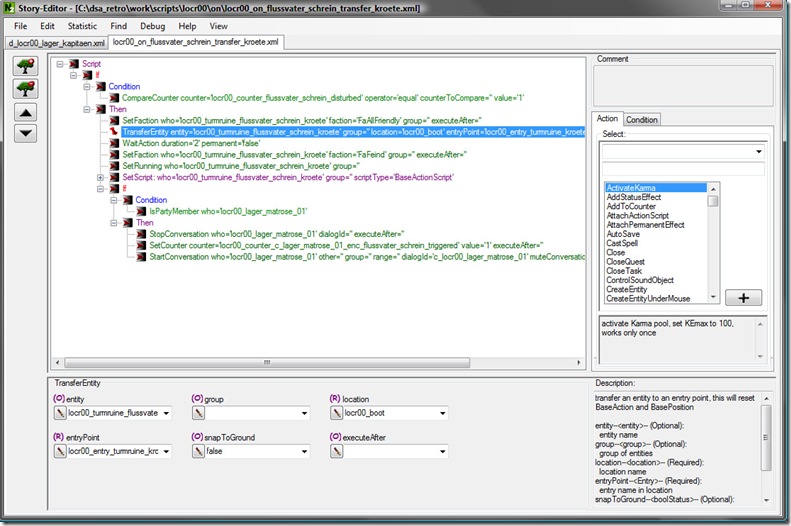
story_editor_1

We opted against a traditional scripting language, but instead used a “point and click” approach. A script is just a simple collection of Conditions and Actions. These could just as well be wrapped into LUA functions for instance. Our current approach is probably not as powerful as real scripting system, but definitely less error-prone and easier to control.

Finally here’s the Story Editor when working on a dialog:
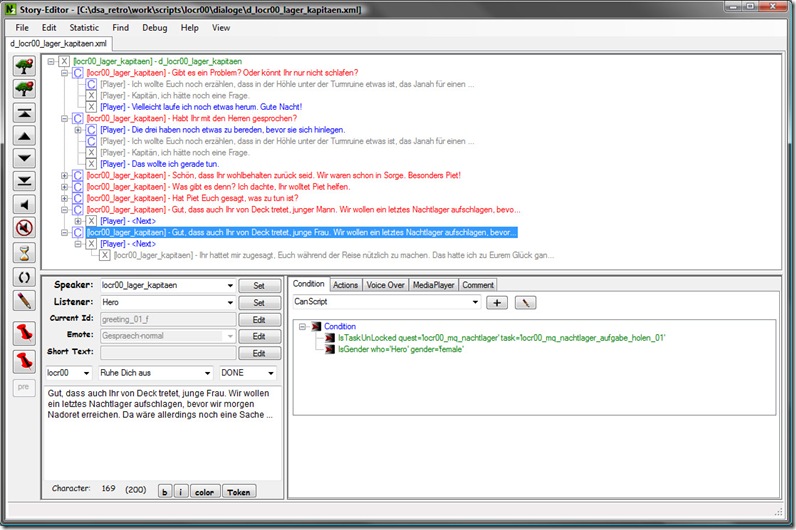
story_editor_0

Dialog takes can be associated with Conditions (to show or hide dialog takes based on some in-game condition), or Actions (to manipulate the game world as the result of a conversation). The Comment tab on the right side is most useful to add instructions for audio recording sessions.


The Sequence Editor

In the first Drakensang, in-game cutscenes had been hand-scripted by defining a sequence of Actions in the Story Editor, basically in the most un-intuitive way imaginable. For the new Drakensang, we wrote a whole new “Sequence subsystem” along with a new tool (the Sequence Editor) which gives control over cutscenes back into the hand of the artists and provides a very intuitive workflow with instant turnaround times (resulting in a dramatic quality improvement if I may say so). Here’s a screenshot of the Sequence Editor in action on a dual-monitor setup:


sequence_editor_0

On the left-hand side is the actual editor, on the right-hand side is the ingame-preview. Tool and game communicate through XML messages over a TCP/IP connection, changes in the tool immediately show up in the preview. The other direction works as well, for instance it is possible to set keys for the camera or objects directly in the preview window, complete with snap-to-ground and other time-savers.

Here’s a more detailed shot of the Sequence Editor:

sequence_editor_1

“Trackbar Elements” from the bottom area (Play Sound, Depth Of Field, etc…) can be drag’n’dropped into the timeline area above. Every trackbar element comes with a number of attributes, most of them can be animated over time. Trackbar attributes are displayed in the right-side column (in the screenshot, I have selected an “Ambience Bubble” element which allows to manipulate the ingame lighting, posteffect parameters, and other stuff which is important to set the visual “mood” of a scene). Animated parameters are edited in the Graph Editor which looks and feels very similar to Maya’s graph editor window:

sequence_editor_2

It’s important to note that complex character animations are not created in the Sequence Editor, instead the sequence system will usually only trigger existing character animations from the character’s animation library. How complex character animation tracks are is up to the cutscene designer. Sometimes its better to fire a lot of small, generic animations and do the path-animation in the Sequence Editor, sometimes it’s better to generate one big motion-capture animation for the entire cutscene, complete with the actual character movement.

One very cool feature of the sequence system is its extensibility. Simple trackbar elements, like “Depth Of Field” or “Camera Shake” can be implemented in under an hour by extending an XML config file which describes the attributes of the new element to the editor tool, and by writing a very simple subclass in the engine which connects the animated values of the trackbar to another subsystem (for instance the PostEffects subsystem in case of the Depth Of Field trackbar).


The Table Editor

The new Table Editor is aimed at finally replacing the Excel tables for game object template data. In Drakensang (or Mangalore in general) a game object’s persistent state is simply described by a collection of typed key/value-pair attributes. Different game object categories have different sets of attributes. For instance a Monster game object has a different attribute set then a Weapon game object.

Traditionally, we had one Excel table per game object category, and one line in the table per game-object template. The value of some of the attributes (instance attributes) can be set in the Maya level editor to a different value for each game object instance.

Some of the bigger game object tables became a really critical bottleneck during the production of Drakensang, since only one person could work at a table at a time. Also even though the tables were saved in XML format, both CVS and SVN are pretty much useless for merging.

Thus the idea was born to move the game data tables into a true database backend, and then create one generic “Table Editor” and later on, several smaller, specialized Editor tools which basically provide a different view into the database. This is also the very first step of moving away from Maya as a level editor towards a truly collaborative level design environment.

Here’s a screenshot of the generic Table Editor tool:

db_frontend

On first glance, this just looks like a nifty Excel replacement, but under the hood it is much more:

There’s a complete user system with login and access rights (in the screenshot above, I can see that I am currently logged in as “floh”, and that 1 other user is currently editing the Weapon-Table).

Then there’s a complete revision control system. The table basically extends into the time dimension, and it’s possible to inspect the table at any point in the past. There’s also a very detailed change-log, which not only tells me who modified the table at what time, but also all the changes made to the table:
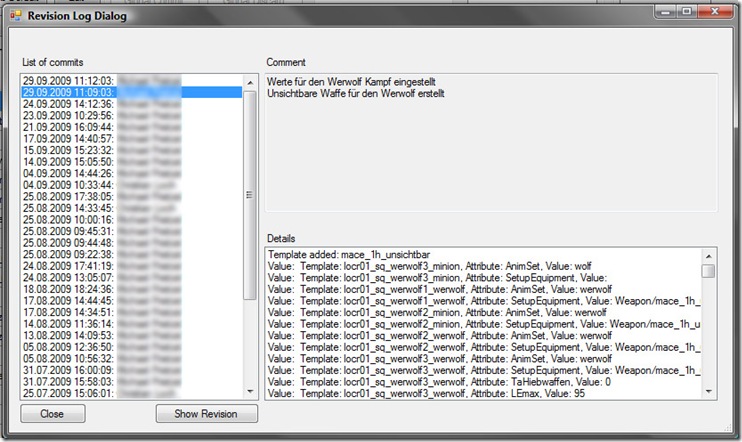
db_editor_changelog

Of course it’s also possible to revert the content of any cell to any point in time.

When a level designer changes values in a table, it will only happen in a local sandbox (the changed values already live in the central database, but are marked as local data of the user). This allows a level designer to mess around with the tables without affecting the other users. When everything works as expected, the changes are committed into the “global domain” and the new values are visible to all.

The generic database table editor tool is very powerful, but the whole system really shines with specialized front-end editors like this:

db_special_frontend

This is basically just a different frontend to the global game database with a specialized GUI for efficiently equipping characters and chests in the game. The general idea here is that such a specialized editor tool is written for tasks where working with the generic editor is not desirable because it would be too cumbersome, un-intuitive or error-prone.

There’s also a lot of interesting work going on in our build-pipeline at the moment, but I’ll leave this to another post :)

13 Sept 2009

Workload

I’ve been playing around with getting N3 up and running in a pure web environment, running without local installation, pulling all data from a web-server instead of the local hard-disc, embedding rendering into a web-browser and so on. Works pretty well so far, but I’m shocked how arcane and downright silly writing a plug-in for Internet Explorer is. I can’t believe MS hasn’t released a simplified, specialized plug-in API for IE by now, but instead one is still required to dive right into the disgusting cesspit that is ActiveX / OLE. I pity the poor souls who had to make a living in the 90’s grinding on code for OLE or CORBA. Compared to .NET today, this really was software development hell.

On the other hand, NPAPI, the plug-in API for everything else then IE, also hails from the 90’s but it’s clear that it was designed by sane people, and to do one thing right instead of all things poorly: to let people write plug-ins for the Netscape browsers. Embedding N3 into Firefox was a matter of hours. But I already wasted 2 weekends even getting a clear idea how to do the same thing in IE, and every time I’ve finished another doc-reading-session I feel like I must wash my hands.

Gaming! If not for XBLA I would have considered to give up console gaming in the past months and return into the PC camp. Game prices for the 360 and PS3 are simply hilarious right now in Germany. 70 is the new 60 for quite a while now (and 60 Euros was already the outrage when “next-gen” started). Combined with the fact that it feels like half of the games are not even released in Germany it really doesn’t make a lot of sense to own a 360 (or PS3). The new Games On Demand service on Xbox Live just makes things worse. Of course you only get the crappy German versions of games (remember, there’s a hard IP address region check on Xbox Live), and whoever thought that 30 Euros for a 3 year old launch game is a good idea clearly lost touch with reality.

Thank god the UK exists, free haven and last stronghold of console gaming in Europe, where prices are reasonable and censorship doesn’t exist. England is probably saving the 360 in Germany right now. God Save The Queen :)

But not all is bad in the console world. XBLA has reinvented itself during the summer. Games like Battlefield 1943, Trials HD, and Shadow Complex catapulted the service to a new quality and sales numbers level. IMHO, XBLA was in dire danger to become a dump for cheap-ass retro-titles, but since Battlefield everything has changed. I’ve had more fun with Shadow Complex then with Gears 1 and 2 combined. I hope the success of SC means Gears 3 will become a bit more interesting (of course I don’t want a side-scrolling Gears, but I’d like to see more exploration and maybe some character up-leveling).

Dirt2 was a day-one for me, but at first I was terribly disappointed because I was expecting a somewhat arcady rally game like the original Dirt. Everything which I liked about Dirt was removed and more stuff was added which I clearly didn’t like. Especially the X-TREME bullshit: didn’t like the crap you’re co-pilot was spilling before the race (I’m Mister Smooth, you’re Mister Steady)? Well, now the game is completely full of this shit. I’m only halfway through Dirt2, so I’m not exactly sure, but they removed Pikes Peak (and hill-climbing all together), as well as all the amazing “pseudo real world” tracks in Europe, and replaced them with complete fantasy tracks in more X-TREME locations like China and Malaysia. I’ve been playing a bit of the original Dirt again, and the game still looks pretty darn good compared to Dirt2. The car models in Dirt2 are clearly better, the environment in Dirt2 is more detailed, but for some reason don’t look as “realistic” as in Dirt1. The European tracks in Dirt simply nailed the look of a dark German forest during a rainy day. Dirt2 looks a lot more like a typical  video game (Malaysia is a looker, though). Well, I still made my peace with Dirt2. It’s not a rally game, it’s a pure arcade racer now. It looks very good, it plays well, its fast paced, and it has a really good multiplayer mode. But the name Colin McRae does not belong any longer on Dirt2’s box.

Now that the rally-genre is completely dead on the consoles I really wish Turn10 would step in and settle the issue once and for all. Give us Forza Rallysport already. Forza’s driving model is too good for just one game :)

I gave in to the hype and am currently about halfway through Arkham Asylum. My brain hasn’t been “indoctrinated” by American comics during my childhood. As a result I find that whole super-hero thing completely silly. I never enjoyed a single Marvel-licensed game (I think my record was like 20 minutes into one of the Spiderman games), and with few exceptions, all of the movies were utter crap (especially the Batman movies, haven’t seen the last one yet though). So… I was a bit skeptical about yet another super-hero game, to say the least. Well, what can I say? The game is fucking great! It’s a bit too old-school here and there (for instance, there’s A LOT of air duct crawling in the game). Sometimes I believe there’s only one guy in the gaming industry who’s doing all the air-ducts. He’s probably started his career in Half-Life, and then went on to Splinter Cell, Riddick, MGS and probably every other stealth-shooter ever made. So that’s a bit strange, crawling around in air ducts as The Batman. There are other strong design clichees at work in the game here and there. For some strange reason, some corridors in the Asylum look like they were stripped from a space-craft (you know, one of those typical video game space ship corridors, metallic surface, a bit rusty, hexagonal profile, leaky pipes along the walls). Maybe Mister Airducts brought his brother with him, who’s specialized in corridors.

But that’s just nitpicking, and a true hardcore gamer feels right at home with all the air-ducts and spacecraft corridors… The game itself plays really, really well, especially the slick hand-to-hand combat. There’s a lot to explore, sneaking, planning, nosing around in dark corners, just my thing. At times the game feels like Bioshock, and at other times a bit like Splinter Cell, but all in all this is the best implementation of the Batman universe I have ever seen, better then the movies anyway :)

16 Aug 2009

XNAMath

With all the focus on the console platforms I didn’t notice one very cool addition to the March DirectX SDK: XNAMath. This is basically the traditional Xbox360 vector math lib, ported to the PC with SSE2 and inlining support. The N3 math classes are now running from the same code base on top of XNAMath for the PC and Xbox360 platforms. Maik has spent a few days to analyze the generated code and after some tweaking the improvements for our simple math benchmarks are absolutely dramatic, up to 4x faster on the PC side!

We had to change our memory allocation routines on the PC to always return 16-byte aligned memory, without this, XNAMath isn’t really useful since the aligned load/store functions can’t be used on vectors residing in heap buffers. Really strange that there isn’t a way to do this through the Win32 heap functions directly (or is there?).

Other then that I’m currently deep into “jobifiying” the render thread, in order to free the PS3-PPU from the mundane number-crunching tasks. Properly jobified code will also “automatically” run about 2x faster on a 2-core PC, and about 3..4x faster on the Xbox360, since even single jobs will be split and processing will be distributed to worker threads. The actual speedup may even be higher, since the data must be re-organized into small independent chunks (“slices”) of about 16..32 kByte each in order to make the best use of the SPU local memory, and this improved spatial locality is also extremely beneficial for CPU caches on the other platforms (I think I’m starting to sound like a record, but I can’t stress enough how good this data-reorganization will be for N3 on ALL platforms :)

28 Jul 2009

Brain Rot

I think working on the PS3 is slowly destroying my higher brain functions. All I can think of at the moment are cycle counts, cache misses, memory latency, compiler intrinsics and synchronization issues. It’s becoming harder and harder to communicate with humans, let alone formulate a proper blog post. On one hand I welcome this fallback into nerd-dom, reminds me of the time when I learned programming by hacking hex-code into the 256 bytes of RAM of the LC-80. On the other hand it’s incredibly frustrating because everything takes so fucking long. Working for 3 days on a small problem which doesn’t even exist on other platforms isn’t fun. But ultimately the PS3 port will be incredibly good for Nebula3 because it forces me to think very hard about the data layout and data flows in the engine, and the PS3-port is now laying the foundation to scale beyond 2..3 cores on all future platforms.

So, quick status update before I turn into a zombie:

  • We’ll support FMOD in the future, integration into Nebula3 is currently underway. Only sensible way to do sound in multiplatform projects IMHO.
  • I have implemented Wolfgang Engel’s light pre-pass renderer in the PS3 port. I think we’ll use this also for the other platforms (well, except the Wii of course). Very cool stuff and solves a lot of problems on the fragment-shader level (jeez, I meant pixel-shader). I’ll write a bit more about this later.
  • I’m currently implementing a job system for Nebula3, designed around PS3 SPURS jobs. On other platforms, jobs will run in a thread-pool on the CPU. It will not be completely multiplatform, but it will be easy to create and maintain jobs for multiplatform projects (the only thing not multiplatform will be the actual job function, but this is usually just a few (maybe a few dozen) lines of code). Once I have profiling results I’ll write a blog post about the design and usage of the job system (it’s a bit different then what I described here).
  • The multiplayer component of N3 is currently being rewritten and ported to Xbox360 (and later PS3). The PC version (and probably PS3 version too) is based on RakNet, on the 360 we’re using an API from the XDK.
  • I have completely rewritten the whole StringAtom system for performance and memory footprint and have dropped the generalized Atom<> and Proxy<> classes (which the old StringAtom system was built on). The new system is hardwired for strings and nothing else.
  • Call Of Juarez BiB totally caught me by surprise. Best game so far this year on the 360 IMHO, and much more streamlined then the original.

That’s all for now. It will be very good to eventually crawl out of the cave into the sunlight and develop back into a normal human being again :)

27 Jun 2009

A more streamlined shader system

I’m currently porting N3’s shader system to the PS3, and while I got it basically working, I’m not satisfied because it’s not really possible to come up with a solution that’s really optimized for the PS3 without creating my own version of the DirectX FX system. Currently N3 depends too much on obscure FX features which actually aren’t really necessary for a realtime 3D engine. So this is a good time to think about trimming off a lot of fat from the shader classes in CoreGraphics.

I think the higher level state management parts are in pretty good shape. The FrameShader system divides a render-frame into render-passes, posteffect-passes and render-batches, draw-calls are grouped by shader-instance. All together these do a good job of preventing redundant state switches. So above the CoreGraphics subsystem (almost) everything is fine.

Here’s how shaders are currently used in N3:

  • FramePass: a pass-shader sets render states which are valid throughout the whole pass (for instance, a depth-pass may disable color-writes, and so on…), but doesn’t contain vertex- or pixel-shaders
  • FrameBatch: this is one level below passes, a batch-shader sets render state which is valid for rendering a batch of ModelNodeInstances with the same ModelNodeType (for instance, a render batch which contains all SrcAlpha/InvSrcAlpha-blended objects would configure the alpha blending render states accordingly). FrameBatches usually don’t have a vertex/pixel-shader assigned, but there are cases where this is useful, if everything that is rendered during the batch uses the same shader anyway.
  • PostEffects: a post-effect-pass uses a shader to render a fullscreen-quad
  • StateNodes and StateNodeInstances: node-instances are always rendered in batches, so that material parameters only need to be set once at the start of a node-batch, other parameters (most notably the ModelViewProjection matrix) must be set before each draw-call.
  • Specific subsystems may use shaders for their own rendering as they please, but let’s just say that those will have to live with the limitations of the new shader system ;)

This defines a pretty small set of requirements for a refactored Nebula3 shader system. By removing feature requirements and making the system *less* flexible, we have a better foundation for low-level optimizations and especially for porting the code to other platforms without compromises.

Here’s a quick overview of the current shader system:

The important classes and concepts to understand N3’s shader system are Shader, ShaderInstance, ShaderVariation and ShaderVariable. The basic idea of the shader system is to move all the slow stuff into the setup phase (for instance looking up shader variables) instead of doing it every frame.

A Shader encapsulates an actual shader file loaded from disc. Shaders are created once at application start, one Shader object per shader file in the shd: directory. Shaders are not actually used for anything except providing a template for ShaderInstances.

A ShaderInstance is created from a specific shader and contains its own set of shader parameter values. For instance, every Models::StateNode object creates its own ShaderInstance and initializes it with its specific material parameters.

A ShaderVariable is created from a ShaderInstance and is used to set the value of a specific shader parameter of the ShaderInstance.

ShaderVariations are the most interesting part of the system. Under the hood, a ShaderVariation is an FX Technique, and thus can have a completely different set of render states and vertex/pixel shader code. The variation that is currently used for rendering is selected by a “feature bit mask”, and the bits of the feature mask can be set and deleted in different parts of the rendering pipeline. For instance, the Depth Pass may set the “Depth” feature bit, and a character rendering node may set the “Skinned” feature bit, resulting in the feature mask “Depth|Skinned”. A Shader can contain any number of variations, each with a specific feature mask. Thus a shader which supports rendering in the depth pass, and also supports skinning would implement (among others) a variation “Depth|Skinned” for rendering skinned geometry during the depth pass.

The biggest problem with the current system is that ShaderVariables are so damn powerful, thanks to the FX system. FX implicitly caches the current value of shader variables, so that a variable can be set at any time before or after the shader is actually used for rendering. FX also tracks changes to shader variables and knows which shader variables need to be updated when it comes to rendering. This extra caching layer is actually not really required by Nebula3 and removing it allows for a much more streamlined implementation if FX is not available or not desirable.

Here are the changes I currently have in mind:

  • A lot of reflection information will not be available. A Shader object won’t be required to enumerate the shader parameters and query their type. The only information that will probably survive is whether a specific parameter exists, but not its datatype, array size, etc… This is not really a problem for a game application, since the reflection information is usually only needed in DCC tools.
  • Querying the current value of a shader parameter won’t be possible (in fact that’s already not possible in N3, even though FX offers this feature).
  • ShaderInstances will offer a way to setup shader parameters as “immutable”. Immutable parameters are set once but cannot be changed afterwards. For instance, the material parameters of a StateNode won’t be changed once they are initialized, and setting them up as immutable allows the shader to record them into some sort of opaque command buffer or state block and then completely forget about them (so it doesn’t have to keep track of immutable parameters at all once they have been setup).
  • Mutable shader parameters (like the ModelViewProjection matrix) are not required to cache their current value, this means that N3 may only set mutable shader parameters after the ShaderInstance has been set as the active shader. This may be a bit inconvenient here and there, but it relieves the low-level shader system from a lot of house-keeping.
  • With the 2 previous points a ShaderInstance doesn’t have to keep track of shader parameters at all. All the immutables are stored away in command buffers, and all the mutables could directly go through to the rendering API.
  • It won’t be possible to change rasterization state through shader variables at all (like CullMode or AlphaRef - basically, everything that’s set inside a FX Technique), shader variables may only map to vertex- or pixel-shader uniform constants.
  • N3 still needs to call a Commit() method on the shader instance after setting mutable parameters and before issuing the draw-call since depending on the platform, some housekeeping and batching may still be necessary for setting mutable parameters efficiently.
  • Shared shader parameters will (probably) go away. They are convenient but hard to replicate on others platforms. Maybe a similar mechanism will be implemented through a new N3 class so that platform ports have more freedom in implementing shared shader parameters (shared parameters will likely have to be registered by N3 instead of being automatically setup by the platform’s rendering API).
  • The last fix will be in the higher-level code where ModelNodeInstances are rendered:
    • Currently, draw-calls are grouped by their ShaderInstance, but those instance-groups themselves are not sorted in a particular order. In the future, rendering will also be sorted by Shader and active ShaderVariation, this allows to change the vertex and pixel shaders less frequently (changing the pixel shader is particularly bad).
    • Currently, a ShaderInstance object contains a complete cloned FX effect instance, in the future, a shader instance will not use a cloned effect - instead, immutable parameters will be captured into a parameter block and mutable parameter changes will be routed directly to the “parent” FX effect.

Another mid-term-goal I want to aim for is to reduce the number of per-draw-call shader-parameter-changes as much as possible. There are a lot of lighting parameters fed into the pixel shader for each draw call currently. Whether this means going to some sort of deferred rendering approach or maybe setting up per-model lighting parameters in a dynamic texture, or trying to move more work back into the vertex shader I don’t know yet.